21
Mar

Galaxy S26 Ultra Review – World’s First Privacy Display, and Evolution toward Agentic AI Phone

Galaxy S26 Ultra Review, Samsung Galaxy S26 Ultra
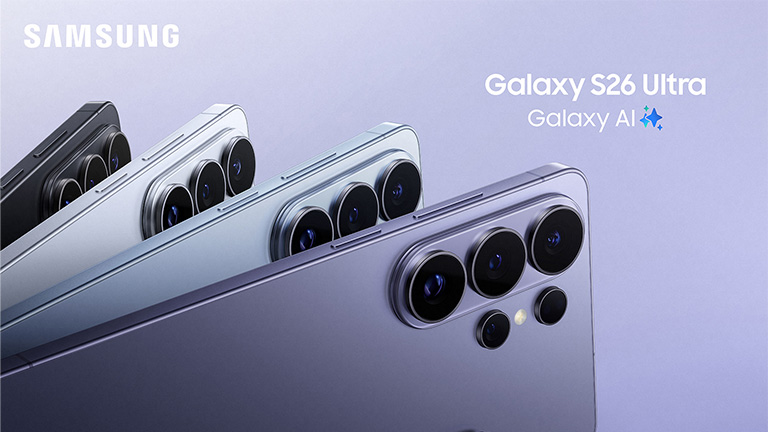
After many years of incremental performance improvements, Samsung introduced an interesting new hardware feature in its latest flagship Galaxy S26 Ultra — Privacy Display. This offers immediate, tangible benefits to all, especially privacy-sensitive and enterprise users.
I received a review unit at the Galaxy Unpacked event in San Francisco on Feb 25, 2026. It is a fantastic phone with tons of improvements to the camera, AI features, and, of course, the display.
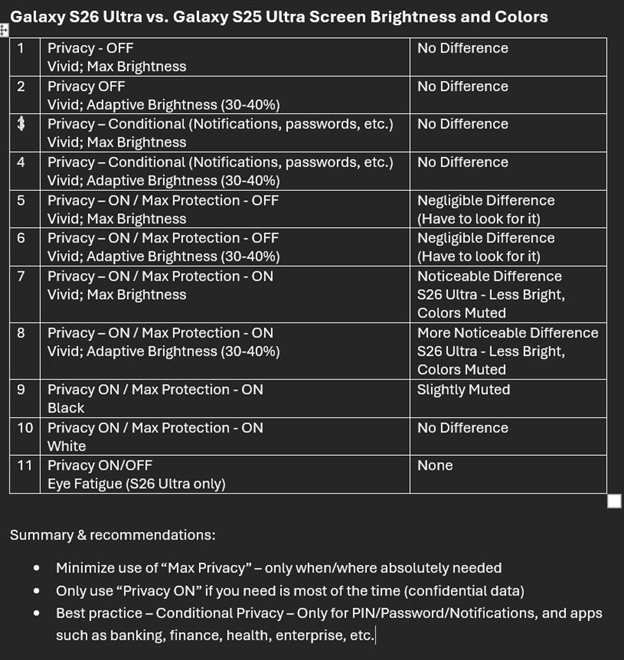
There are complaints in the media about Galaxy S26 Ultra’s display not being bright enough, and some people with sensitive eyes experiencing eye fatigue and headaches. Because of that, this time, I took extra time (more than three weeks) to test and use the phone more rigorously before posting this review. I ran multiple tests comparing Galaxy S26 Ultra and S25 Ultra displays across various configurations and found negligible brightness loss with privacy ON and a noticeable loss with maximum privacy ON. However, once I configured it correctly (conditional privacy), had no issues, nor did I find the display brightness lacking. The summary of my findings and recommendations is in the table below, and the full details, including comparison pictures, are in my X (Twitter) and LinkedIn posts.
Check out our other flagship product reviews here

Industry’s first built-in Privacy Display

Today’s smartphones are a feast for peeping Toms, be it sitting on the planes, trains, meetings, or anywhere, where there are curious people around you. This is even more problematic for enterprise users, who often access confidential information from their phones. The only solution so far has been slapping a privacy screen on the display, which is a hassle and ruins the display experience. But no more, with S26 Ultra’s Privacy Display.
The new display uses two types of LEDs: one regular type that emits light in all directions, and another that emits light only in the front. When Privacy Mode is turned ON, only the new directional LEDs activate, blocking visibility from all sides except the front. Supporting privacy at the LED level allows activating privacy mode only when and where needed. For example, when viewing confidential or private content, only for selected apps, notifications, PIN, and password entry screens, etc (conditional privacy).  The feature is highly configurable, even allowing maximum privacy, which makes the viewing angle even narrower, with sharp roll off.
I was actually surprised by how often I use it. It was a lifesaver during my recent trip to Mobile World Congress. I was able to read all the embargoed press releases, NDA decks, emails with confidential information, etc., on my flight without worrying about someone peeking in. Without the S26 Ultra with the Privacy Display, I would have had to wait till I got off the plane to check them out. I wish such displays would soon come to laptops too. I can work worry-free anywhere. Another important benefit of this display over screens is that it blocks visibility from the top and bottom as well.
Since maximum privacy protection noticeably reduces screen brightness, it is best to use that mode only when needed. Most other times, set it to conditional privacy, so that you get the best of both options (bright display and adequate privacy).

Evolution toward Agentic AI Phone

Galaxy S25 graduated Galaxy AI from novelty to utility, and S26 takes it even further, eventually making it an Agentic AI Phone. S26 Ultra introduces new AI features and enhances and refines many existing ones.
The “Now Briefs” are made agentic and action-oriented. They now extract relevant information from messages, calendars, and other sources, learn behavior, understand routines and context, and offer useful, actionable suggestions.
There are useful new features, such as Call Screening and Scam Alert. As the name suggests, Call Screen receives the calls like your personal assistant and summarizes the content. This is super useful if you are like me and get lots of cold sales calls, mixed with some important ones. I use this feature at least a few times a day. Scam Alert monitors the discussion during the ongoing call and sends a visual alert if it detects any scam. I never got this alert, but it is extremely beneficial for the elderly and non-tech-savvy folks who are easily duped by online fraud.
Galaxy AI has become a somewhat confusing mix of Bixby and Google’s Gemini. Bixby is primarily used for tasks within the phone and can work without cloud connectivity (on-device processing only). Whereas Gemini is a universal chatbot that requires cloud connectivity. I use both of them quite extensively in my daily life.
Bixby has access to all the apps and settings on the phone, so it can execute multistep, multi-app tasks, like an agent. For example, you can ask it to set up a meeting with someone at a specific time on a specific day.  Bixby will find the person in the contacts app, schedule the meeting in the calendar app, and send the invite email in the mail app. Bixby was quite useful during MWC last week. I could easily search my mailbox for specific emails and meeting details, find overlaps, etc., while on the move, with just voice prompts, using the new Galaxy Buds4 Pro.  I could accomplish all this while Bixby is set for “device-only” data processing. Gemini can’t do any of this because it doesn’t have access to the apps.
But the confusion arises because Bixby can do most, if not all, of what Gemini does. I highly recommend that Samsung implement a single interface for Galaxy AI and hide the complexity of model selection from regular users. Perhaps AI agents will become that single interface. Meanwhile, I suggest using Bixby for on-device AI and Gemini for cloud AI.
Evolution to Agentic AI Phone is a journey, and we are at the early stages. Thanks to its SoC, the Snapdragon 8 Elite Gen5 for Samsung, with a strong NPU, the S26 Ultra is already set for that journey.

Improved Camera, better editing, and creative tools

Camera improvements are a staple for any new phone. Keeping up with that S26Ultra brings a slew of camera enhancements, including Nitography. A wider camera aperture provides less grainy pictures in low-light conditions. Super-Steady Horizontal Lock feature provides excellent stabilization for video shoots, and many more. I used both features and observed a noticeable improvement compared to S25 Ultra.
Again, thanks to Snapdragon SoC, there are also tons of AI-based upgrades to photo and video editing tools, such as prompt-to-edit, generative erase, audio erase for both native and third-party apps, and many more. A new hardware-accelerated upscale engine sharpens both photos and videos.
 A new feature that allows you to change outfits or “clean up” spills on clothing in photos using generative AI. The new Creative Studio lets you sketch an idea or provide a prompt and turn it into a high-quality sticker, invitation, or personalized wallpaper directly in the gallery.
Suffice to say, the S25 Ultra is a must-have for anyone who is privacy-sensitive and for almost all enterprise users. It is also a desirable upgrade for anybody looking for a better performance and an AI-focused phone.
If you want to read more articles like this and get an up-to-date analysis of the latest tech industry news, sign up for our monthly newsletter at TantraAnalyst.com/Newsletter, or listen to our Tantra’s Mantra podcast.